> ## Documentation Index
> Fetch the complete documentation index at: https://docs.miramace.com/llms.txt
> Use this file to discover all available pages before exploring further.
# Quick Start
> Get started in 5 mins or less
### 1. Create Your Project
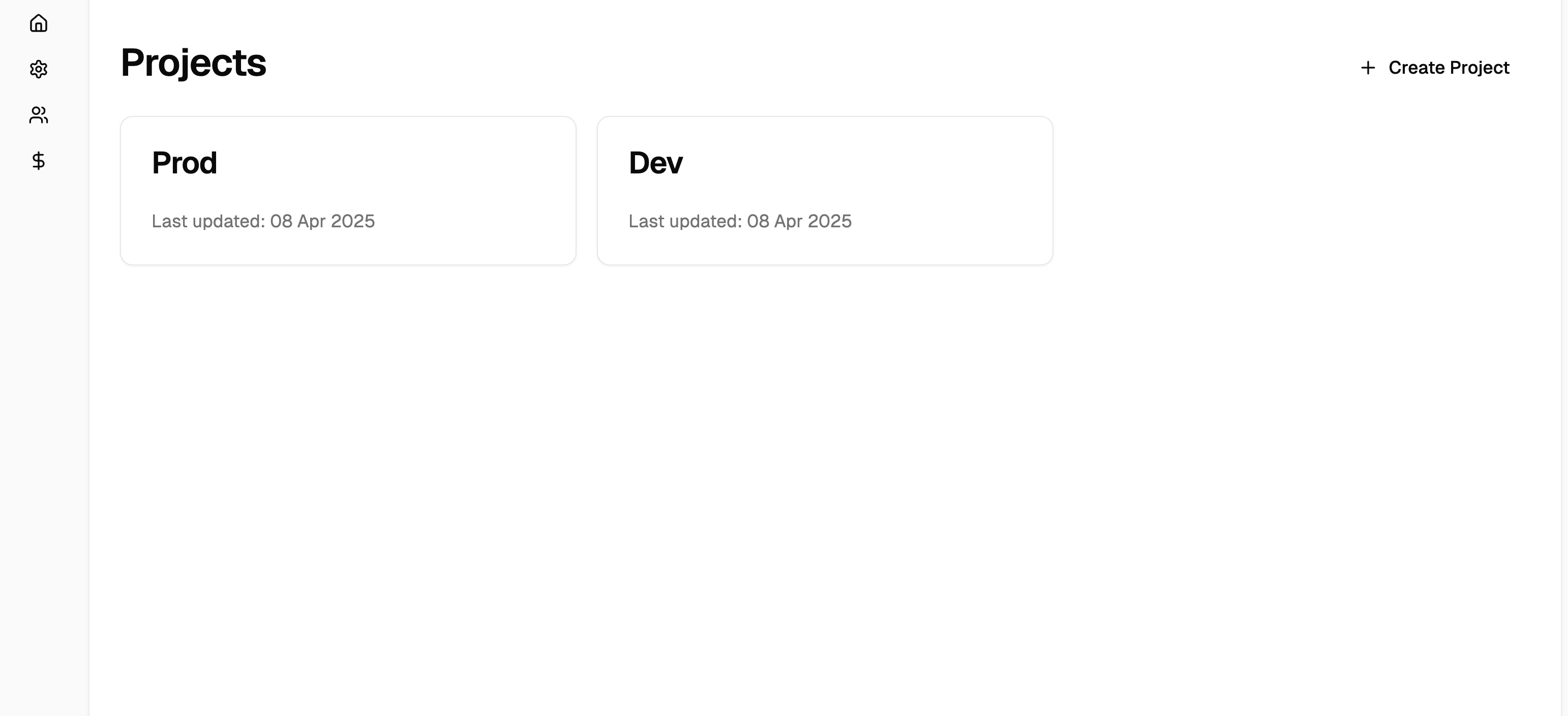
Start by creating a new project in your workspace. Your project will serve as the container for all your patients, tasks, and configurations. We recommend creating projects for dev and prod environments at a minimal.
### 2. Set Up API Keys
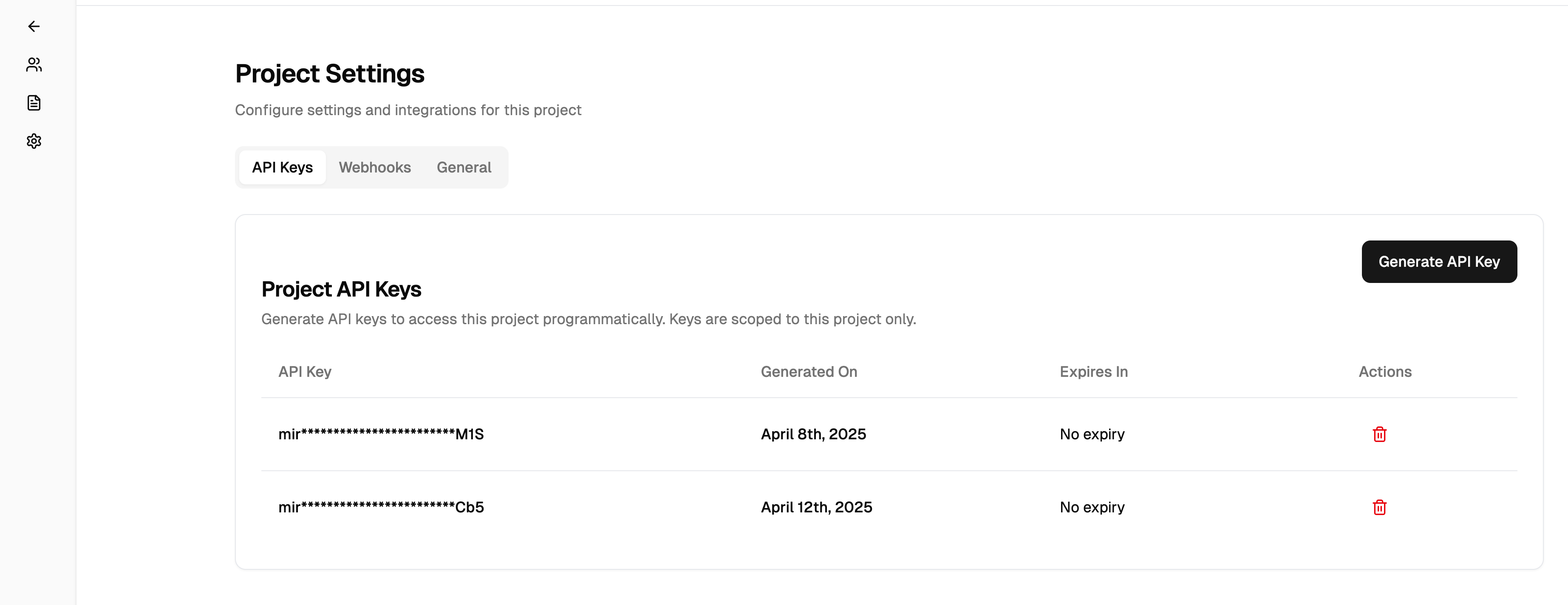
Once your project is created, you'll need an API key to make requests to Mira's API. Generate your API key from the project settings:
1. Navigate to **Project Settings** > **API Keys**
2. Click **Generate New Key**
3. Copy and securely store your API key
Your API key grants access to your Mira resources. Never share it publicly or commit it to version control.
### 3. Configure Webhooks (Optional)
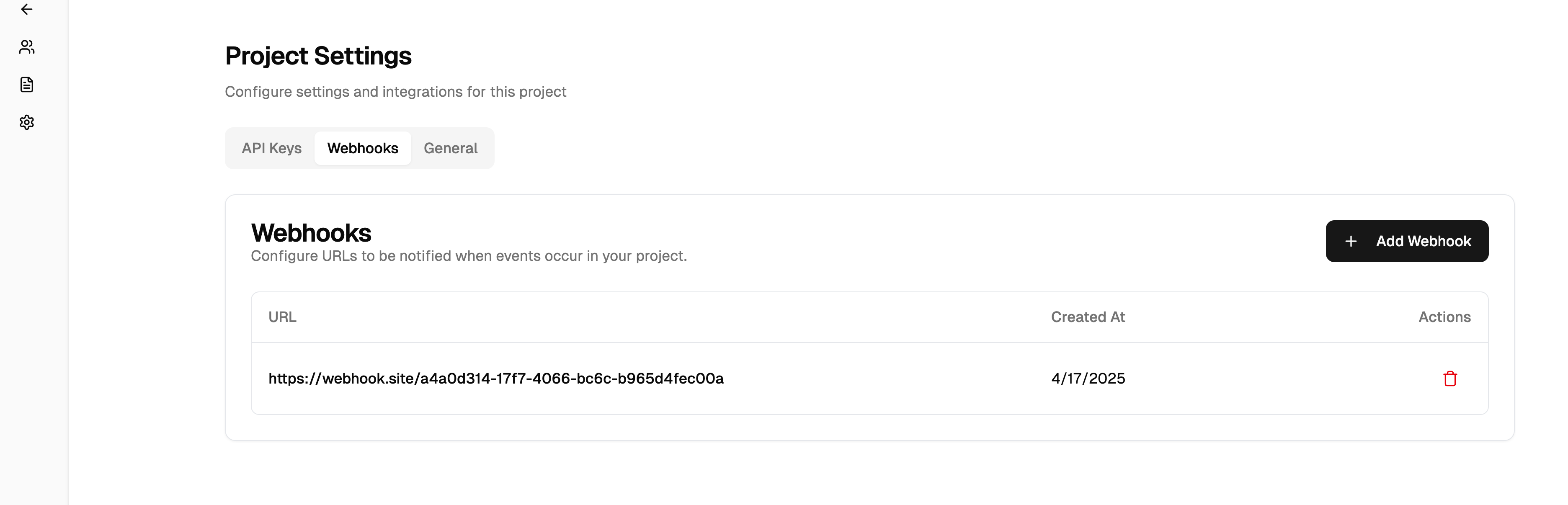
Mira uses webhooks to notify your application about new task updates. For example, when a call has been completed, you'll receive a notification that allows you to fetch the latest task details, including transcripts and recordings.
1. Go to **Project Settings** > **Webhooks**
2. Add your webhook endpoint URL
3. Select the events you want to receive:
* `task.completed` - When a task is finished
* `call.completed` - When a call has finished and recordings/transcripts are ready
```bash Webhook Event Example theme={null}
{
"event": "call.completed",
"task_id": "task_abc123",
"call_id": "call_xyz789",
"timestamp": "2024-03-21T15:30:00
}
```
When you receive a webhook notification, you can use the `task_id` to fetch the complete task details, including transcripts and recordings, using the Get Task Progress endpoint.
### 4. Create Your First Task
Let's create your first patient and task! Here's a complete example of onboarding a patient and scheduling their first appointment:
```python Python theme={null}
import requests
# 1. First, create a patient
patient_response = requests.post(
"https://api.miramace.com/v1/patient",
headers={"Authorization": "Bearer YOUR_API_KEY"},
json={
"project_id": "proj_xyz789",
"phone_number": "+15555555555",
"first_name": "Jane",
"last_name": "Doe"
}
)
patient = patient_response.json()
# 2. Create a task for the patient
task_response = requests.post(
"https://api.miramace.com/v1/task",
headers={"Authorization": "Bearer YOUR_API_KEY"},
json={
"task_type": "SCHEDULE_APPOINTMENT",
"task": "Schedule a follow-up appointment with Dr. Smith",
"phone_number": "+15555555555",
"project_id": "proj_xyz789",
"patient_id": patient["id"],
"task_data": {
"medical_context": "New patient initial consultation",
"timeframe_availability": "Weekdays between 9am-5pm",
"additional_context": "Patient prefers morning appointments"
}
}
)
print(f"Task created: {task_response.json()['id']}")
```
```javascript JavaScript theme={null}
// 1. First, create a patient
const patientResponse = await fetch('https://api.miramace.com/v1/patient', {
method: 'POST',
headers: {
'Authorization': 'Bearer YOUR_API_KEY',
'Content-Type': 'application/json',
},
body: JSON.stringify({
project_id: 'proj_xyz789',
phone_number: '+15555555555',
first_name: 'Jane',
last_name: 'Doe'
})
});
const patient = await patientResponse.json();
// 2. Create a task for the patient
const taskResponse = await fetch('https://api.miramace.com/v1/task', {
method: 'POST',
headers: {
'Authorization': 'Bearer YOUR_API_KEY',
'Content-Type': 'application/json',
},
body: JSON.stringify({
task_type: 'SCHEDULE_APPOINTMENT',
task: 'Schedule a follow-up appointment with Dr. Smith',
phone_number: '+15555555555',
project_id: 'proj_xyz789',
patient_id: patient.id,
task_data: {
medical_context: 'New patient initial consultation',
timeframe_availability: 'Weekdays between 9am-5pm',
additional_context: 'Patient prefers morning appointments'
}
})
});
console.log(`Task created: ${(await taskResponse.json()).id}`);
```
```bash cURL theme={null}
# 1. First, create a patient
curl --request POST \
--url https://api.miramace.com/v1/patient \
--header 'Authorization: Bearer YOUR_API_KEY' \
--header 'Content-Type: application/json' \
--data '{
"project_id": "proj_xyz789",
"phone_number": "+15555555555",
"first_name": "Jane",
"last_name": "Doe"
}'
# 2. Create a task for the patient (using the patient_id from previous response)
curl --request POST \
--url https://api.miramace.com/v1/task \
--header 'Authorization: Bearer YOUR_API_KEY' \
--header 'Content-Type: application/json' \
--data '{
"task_type": "SCHEDULE_APPOINTMENT",
"task": "Schedule a follow-up appointment with Dr. Smith",
"phone_number": "+15555555555",
"project_id": "proj_xyz789",
"patient_id": "pat_abc123",
"task_data": {
"medical_context": "New patient initial consultation",
"timeframe_availability": "Weekdays between 9am-5pm",
"additional_context": "Patient prefers morning appointments"
}
}'
```
That's it! Mira will now:
1. Call the patient at the provided phone number
2. Introduce herself and explain the purpose of the call
3. Work with the patient to find a suitable appointment time
4. Send you updates via webhooks as the task progresses
Watch your webhook endpoint for task updates, or use the Get Task endpoint to check the status at any time.